Format Painter in Apple Pages
September 26, 2017
I mostly use Microsoft Word for documents because Office is the platform of business, but in my more creative side projects I tend to use Apple’s Pages.
One of the things that Word does really well is copying formatting from one place to another. They have a feature called Format Painter, and it can be invoked in any Office app using the little paint brush icon.
Here’s how to get the same effect in Apple’s Pages.
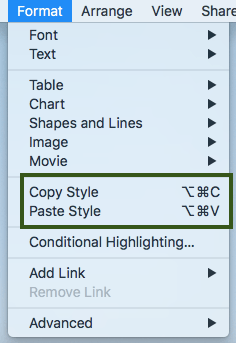
Select the text you want to transfer the formatting of.
Navigate to Format --> Copy Style, or ⌥⌘C.
Navigate to the text you want to transfer the formatting to.
Navigate to Format --> Paste Style, or ⌥⌘V.
Hope this helps someone!