Anatomy of an AI Nervous System
Anatomy of an AI Nervous System
The PAI Algorithm is a 7-phase loop: Observe, Think, Plan, Build, Execute, Verify, Learn. On paper it's elegant. In practice, it's blind. It can't see what the user typed before it starts thinking. It can't remember what it learned after it finishes. It can't protect itself from dangerous commands mid-execution.
The Algorithm needs a nervous system.
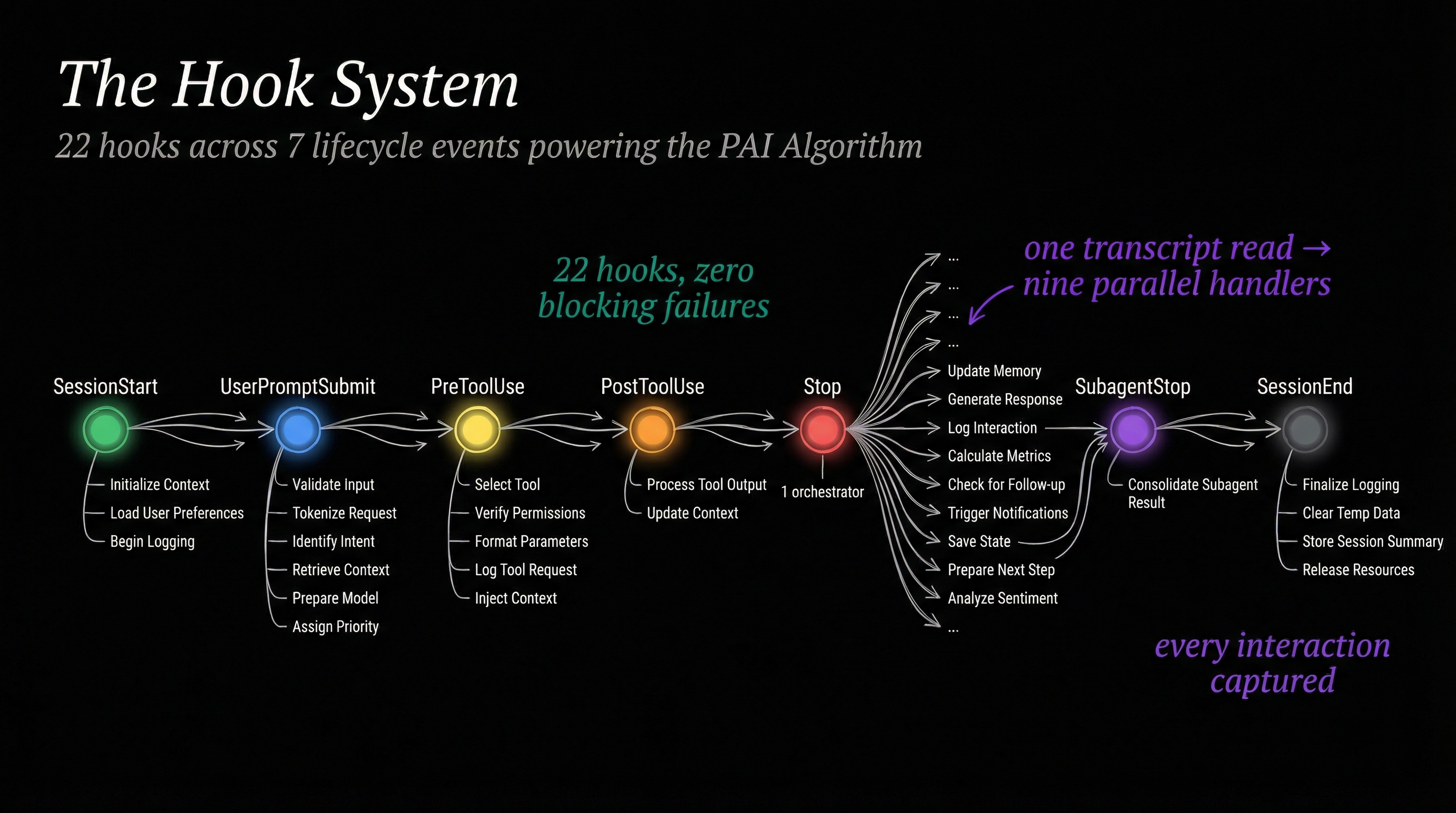
That's what the hook system is — 22 TypeScript scripts wired into Claude Code's lifecycle events, firing before, during, and after every Algorithm run. They don't replace the Algorithm. They give it senses. They give it memory. They give it reflexes.
This post walks through how those 22 hooks orbit the Algorithm, organized not by hook name but by what the Algorithm needs at each stage of its life.
Before the Algorithm Wakes Up
Every session starts cold. The Algorithm doesn't know who it is, what version it's running, or what the user cares about. Three hooks fix that before the first prompt even arrives.
StartupGreeting renders the PAI banner — system stats, version numbers, hook counts. It's cosmetic, but it's also diagnostic. If the banner says "Hooks: 22" and you only registered 18, something broke.
LoadContext is the critical one. It reads the entire PAI skill definition — the Algorithm itself, all capability definitions, identity rules, steering rules — and injects it into the session context via stdout. Without this hook, the Algorithm doesn't exist. The model would respond as vanilla Claude.
CheckVersion pings the npm registry to see if a newer Claude Code release is available. Non-blocking, fire-and-forget. But it means you never accidentally run two weeks behind on a breaking change.
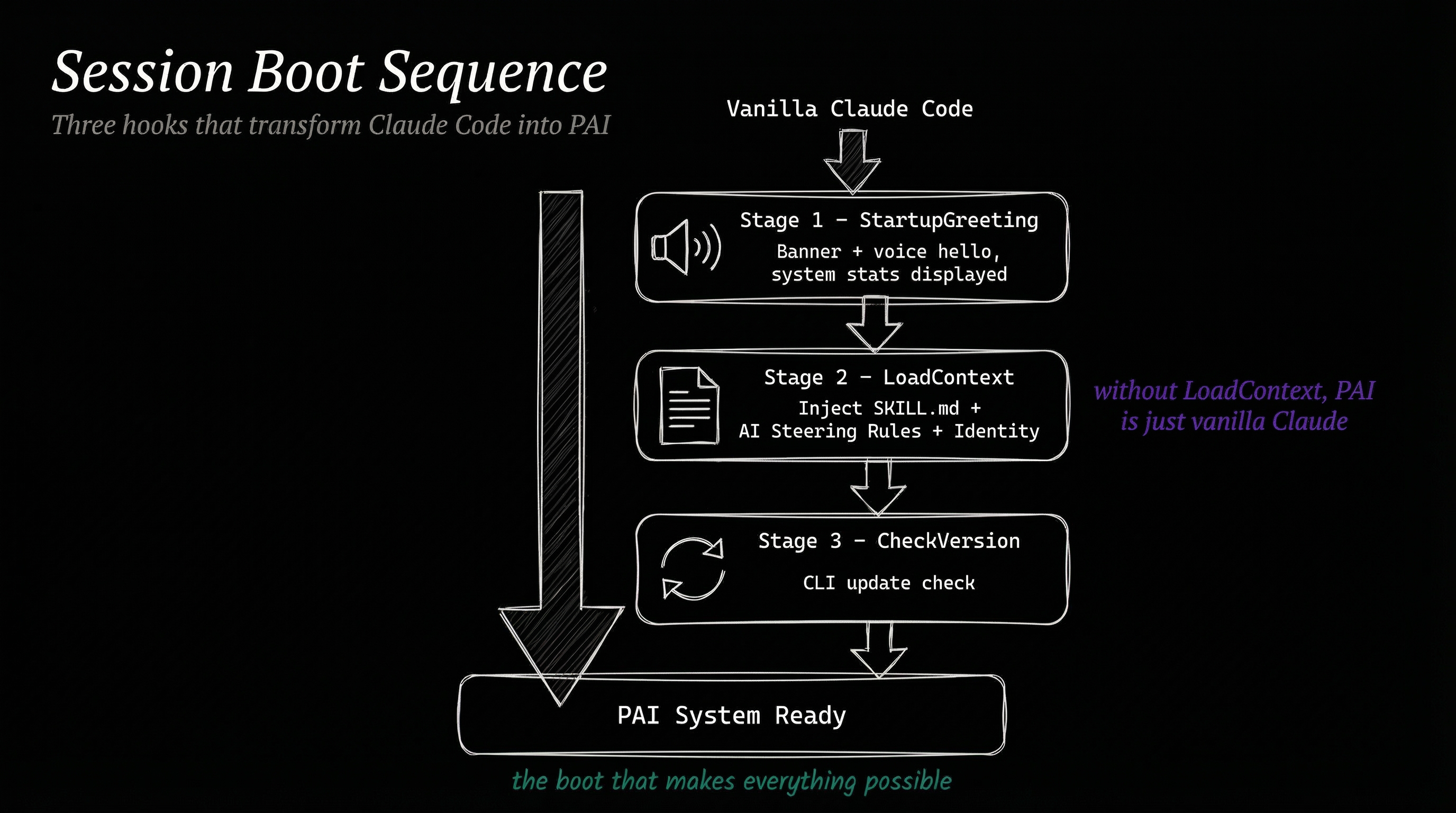
These three hooks turn a blank session into a PAI session. The Algorithm can't start its Observe phase until LoadContext has injected the rules that define what Observe means.
The Moment a Prompt Arrives
The user types something. Before the Algorithm's Observe phase even begins processing that input, six hooks fire simultaneously on UserPromptSubmit. This is where the nervous system earns its name — these are reflexes, not deliberate actions.
AlgorithmEnforcement is the constitutional hook. It reads the incoming prompt and injects a reminder that the Algorithm format is mandatory. Every response, every time, no exceptions. This hook exists because models drift. Without constant reinforcement, the Algorithm format degrades over long sessions.
AutoWorkCreation creates a timestamped work directory under MEMORY/WORK/ and writes current-work.json — a shared state file that other hooks will read and update throughout the session. This is how the system knows what it's working on.
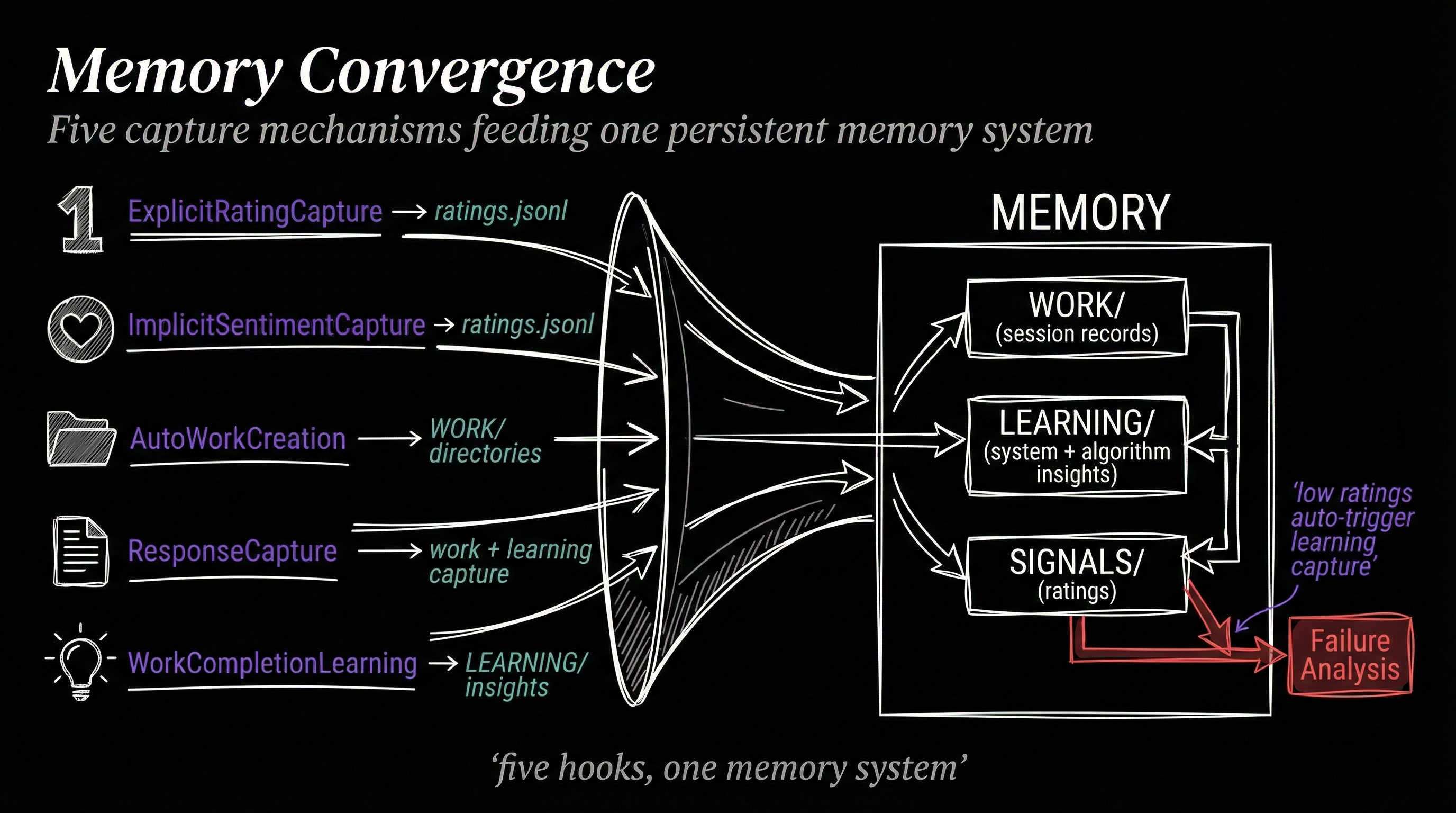
ExplicitRatingCapture scans the prompt for patterns like "8" or "6 - good work" — explicit numerical ratings. When it finds one, it writes to ratings.jsonl, the persistent signal log that feeds the status line and learning systems.
ImplicitSentimentCapture does something subtler. It runs the prompt through a fast inference call to detect emotional valence — is the user frustrated, pleased, neutral? It checks whether ExplicitRatingCapture already fired (to avoid double-counting), then writes its own entry to the same ratings.jsonl.
UpdateTabTitle summarizes the prompt via inference and sets the terminal tab title to something meaningful — "Fixing auth bug" instead of "Claude Code". It also fires a voice announcement so you hear what the system is working on.
SessionAutoName generates a human-readable session name for the conversation log, making it possible to find sessions later without reading UUIDs.
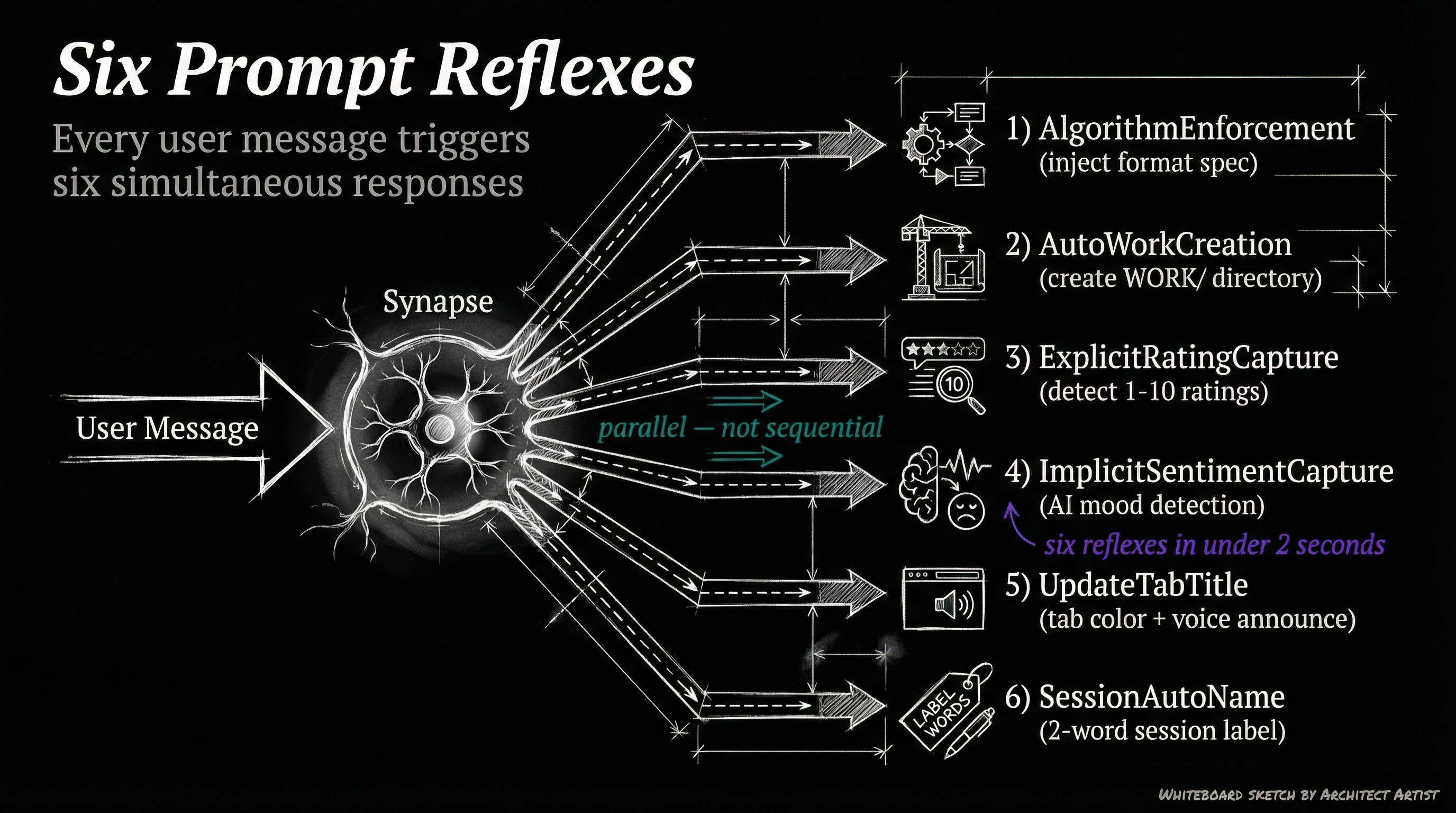
The important pattern here: the Algorithm hasn't started yet. These hooks pre-process the environment so that by the time Observe begins, the system already has a work directory, knows the user's sentiment, has a meaningful tab title, and has reinforced its own operating rules.
The Security Perimeter
During the Algorithm's Build and Execute phases, the model calls tools — Bash commands, file writes, file reads, code edits. Every one of these passes through PreToolUse hooks before execution.
SecurityValidator is the gatekeeper. It fires on four tool types (Bash, Edit, Write, Read) and checks every call against patterns.yaml — a rule file defining what's allowed, what needs confirmation, and what's blocked outright. The hook can return three responses:
{continue: true}— proceed normally{decision: "ask", message: "..."}— pause and ask the userexit(2)— hard block, no override
Every decision gets logged to MEMORY/SECURITY/security-events.jsonl. This means you can audit exactly what the model tried to do across every session.
AgentExecutionGuard fires when the Task tool spawns a subagent. It validates agent configurations, ensures spawned agents inherit appropriate constraints, and prevents runaway agent creation.
SkillGuard fires when the Skill tool is invoked. Its primary job is blocking false-positive skill invocations — the most common being keybindings-help, which appears first in every skills list and gets incorrectly triggered by position bias.
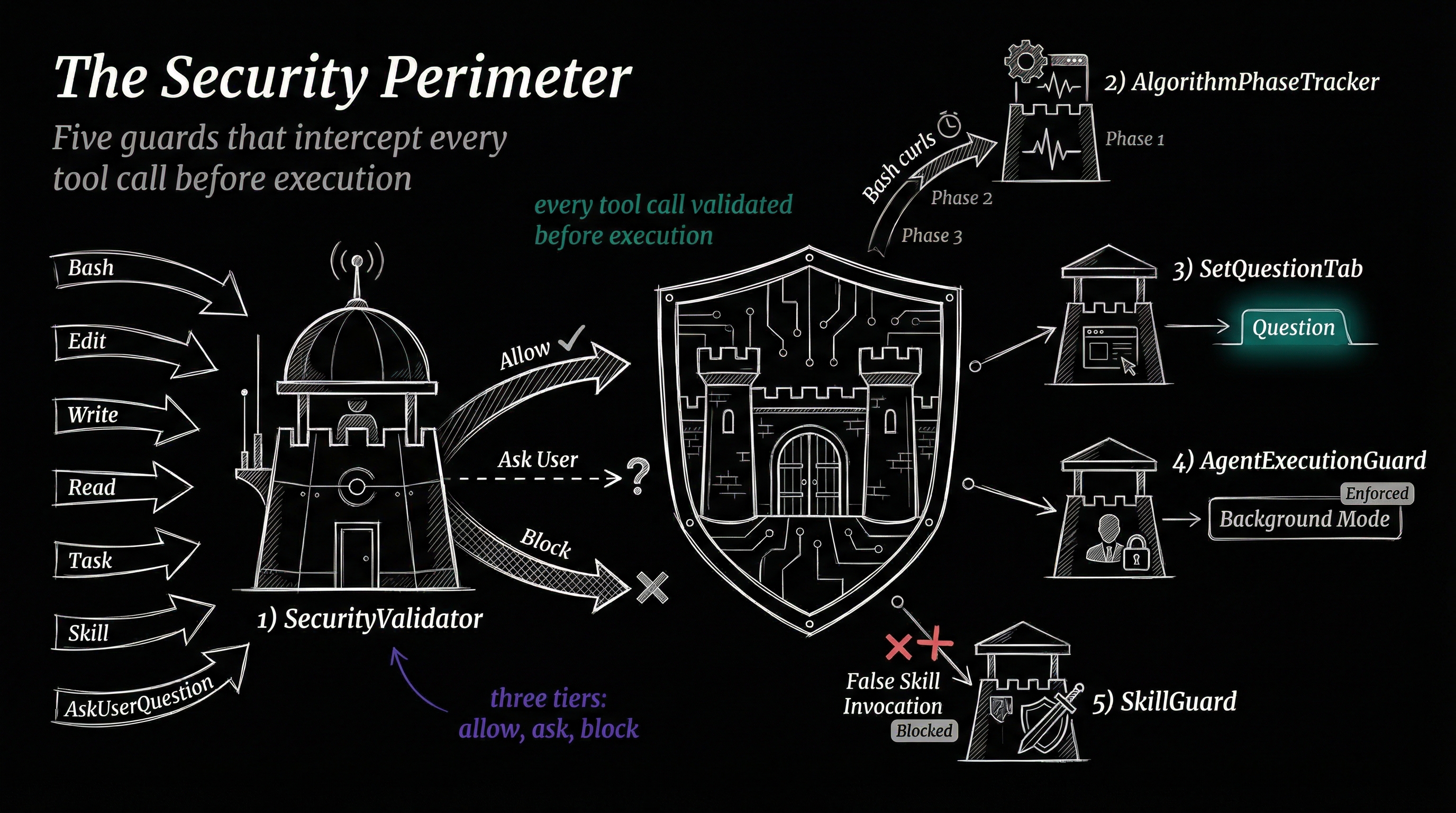
The security hooks don't care which Algorithm phase is active. They operate at the tool level, which means they protect equally during Build, Execute, or any ad-hoc tool call. The Algorithm handles strategy; the security perimeter handles tactics.
Tracking the Algorithm in Real Time
Two hooks create real-time observability into the Algorithm's progression.
AlgorithmPhaseTracker fires on PreToolUse for Bash commands. It watches for the phase-announcement curl commands that the Algorithm executes at each transition — "Entering the Observe phase", "Entering the Think phase" — and writes the current phase to MEMORY/STATE/algorithm-phase.json. This feeds the activity dashboard, which shows a live view of which Algorithm phase each session is in.
CriteriaTracker fires on PostToolUse for TaskCreate and TaskUpdate. Every time an Ideal State Criterion is created or modified, this hook captures the change. It's how the dashboard knows "Session X has 6/8 criteria passing" without reading the full transcript.
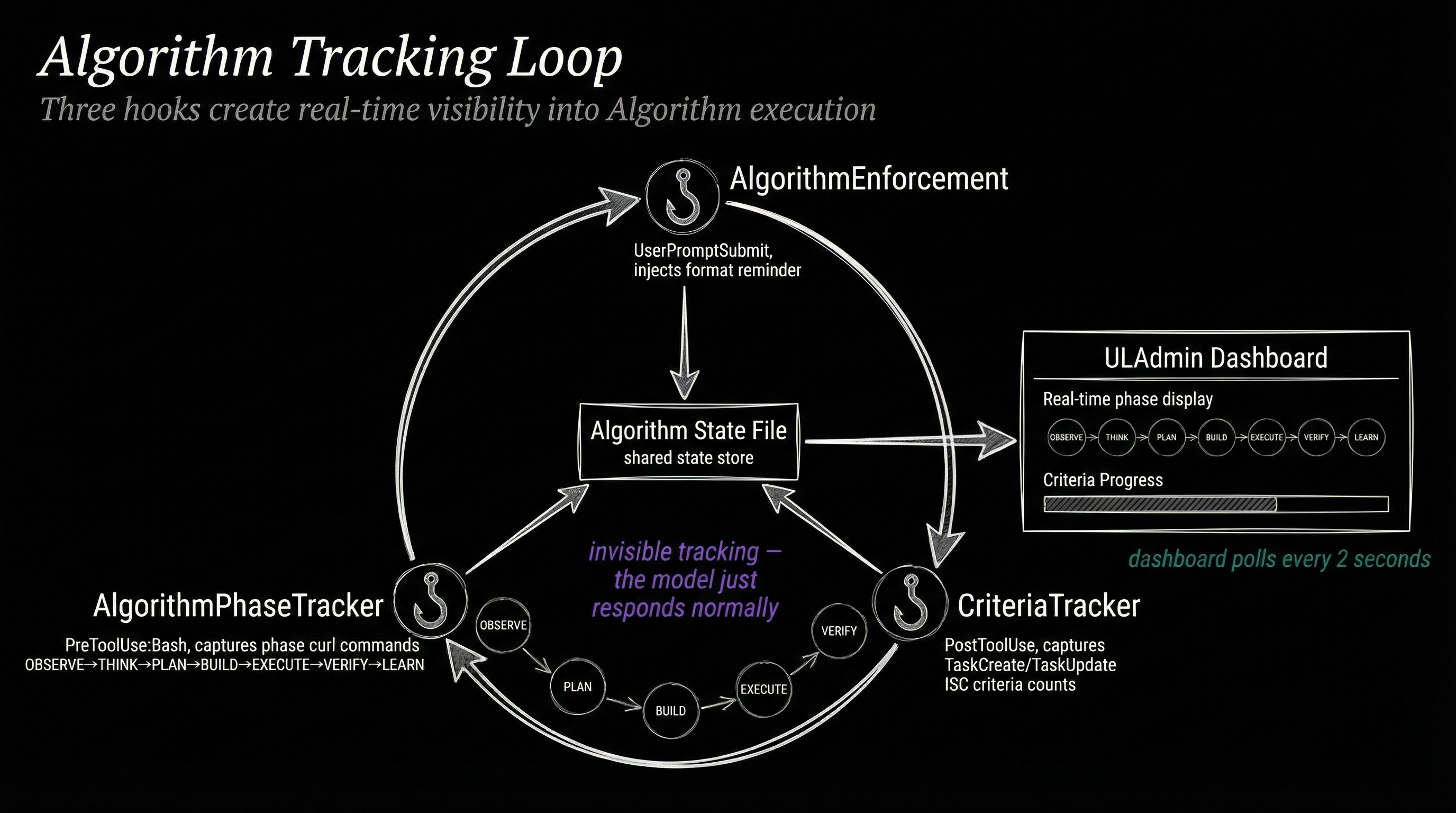
Together, these two hooks make the Algorithm's internal state externally visible. The Algorithm itself doesn't know it's being observed — it just executes curl commands and TaskCreate calls as part of its normal flow. The hooks intercept those signals passively.
When the Algorithm Pauses
Two hooks manage the moment when the Algorithm asks the user a question via AskUserQuestion.
SetQuestionTab fires on PreToolUse for AskUserQuestion. It changes the terminal tab color to amber — a visual signal that the system is waiting for input, not processing. You can glance at your terminal tabs and instantly see which sessions need attention.
QuestionAnswered fires on PostToolUse for AskUserQuestion. Once the user responds, it resets the tab state and can log the Q&A pair for context preservation.
The Nine-Handler Fan-out
When the Algorithm completes a response — after Verify and Learn have run — a single Stop event fires. One hook catches it: StopOrchestrator. But that one hook fans out into nine parallel handlers via Promise.allSettled().
This is the most architecturally interesting part of the system. Instead of nine separate Stop hooks (which would execute sequentially and add latency), a single orchestrator reads the response once and distributes it to:
- AlgorithmStateWriter — Updates the algorithm state file, marking whether the session is active, in LEARN phase, or complete
- TabState — Resets the terminal tab to its default color and title
- VoiceNotification — Speaks a completion summary through the voice server
- ResponseCapture — Saves the full response to the work directory
- SystemIntegrity — Detects file changes made during the response for audit trails
- RebuildSkill — If PAI skill components were modified, triggers a rebuild
- UpdateCounts — Refreshes the system statistics (hooks, skills, files counts) shown in the banner
- SessionName — Updates the session name if the conversation topic shifted
- VoiceEvents — Logs voice activity for the voice event timeline
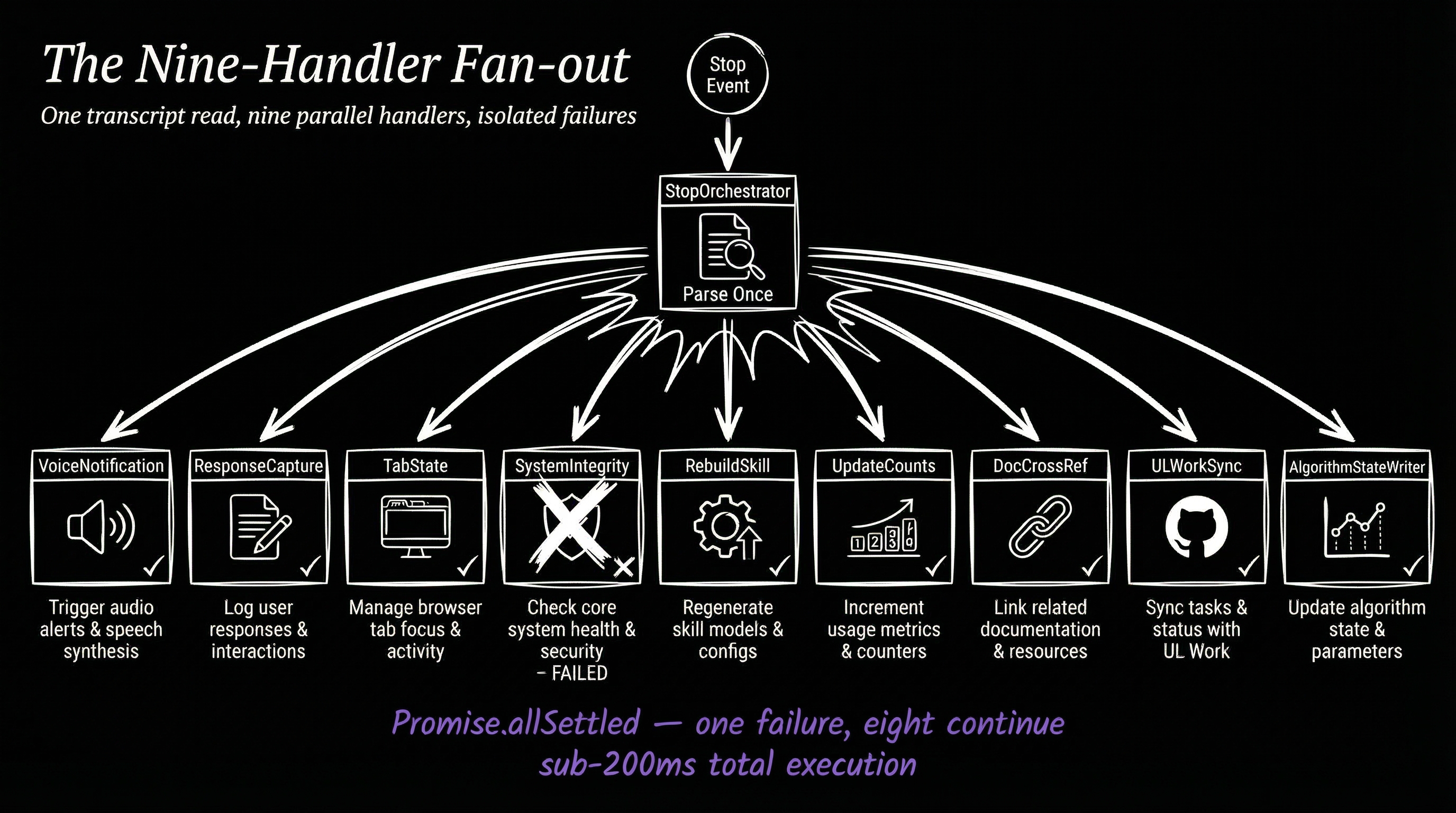
The fan-out pattern means all nine handlers execute concurrently. A voice announcement doesn't wait for file I/O to complete. A tab reset doesn't wait for inference. The total latency is the slowest handler, not the sum of all handlers.
Capturing Agent Output
When the Algorithm spawns subagents during Build or Execute — researcher agents, engineer agents, algorithm agents — each one eventually completes. The SubagentStop event fires for each.
AgentOutputCapture catches these completions and extracts key metadata: what the agent was asked to do, what it returned, how long it took. This gets written to MEMORY/STATE/ so the orchestrating session can reference agent results even after context compaction.
The Voice Pipeline
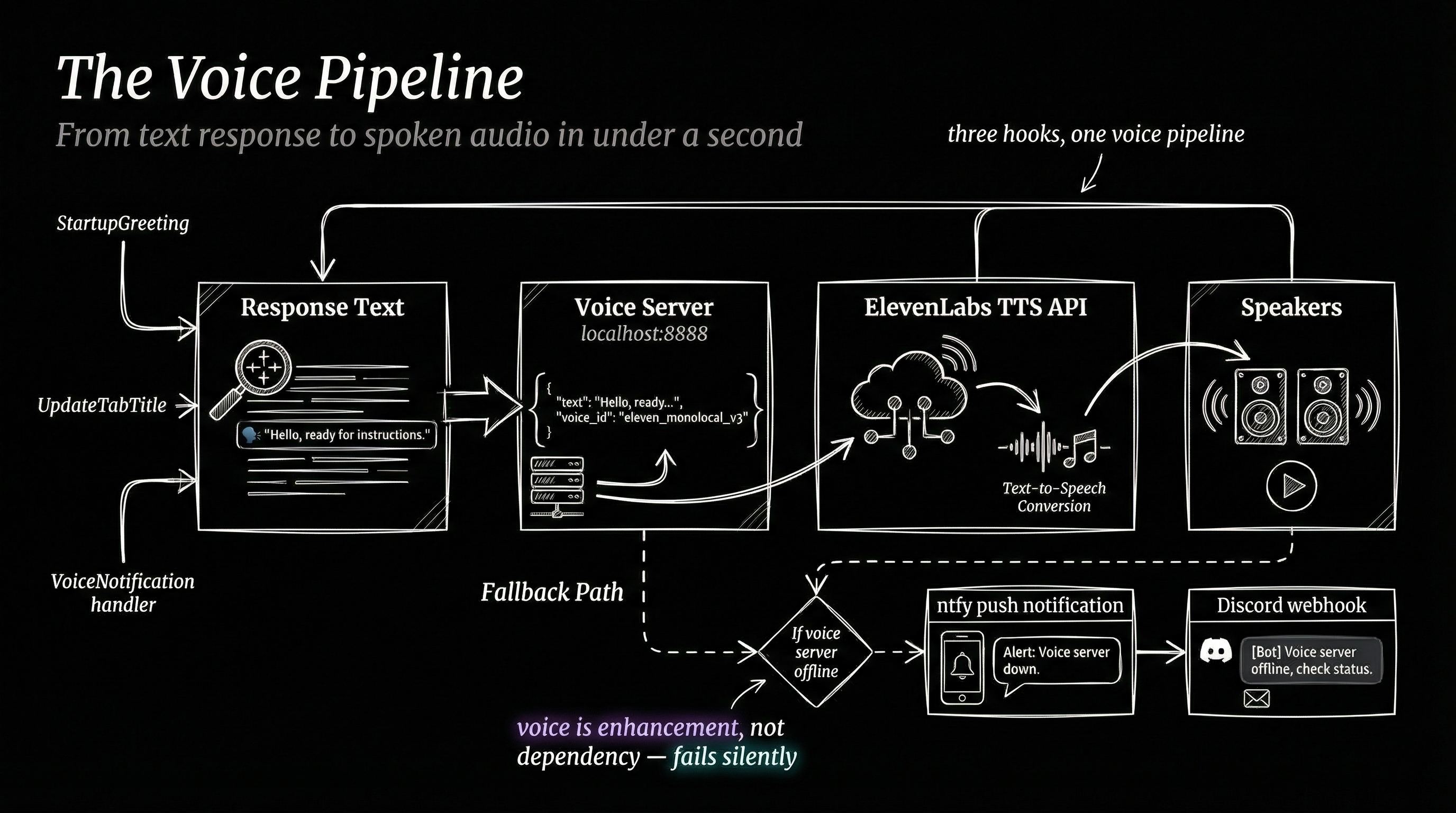
Several hooks feed into the voice server at localhost:8888, but they do it at different lifecycle moments for different reasons.
UpdateTabTitle (UserPromptSubmit) announces what the system is starting to work on — "Fixing auth bug", "Writing blog post". This fires before the Algorithm begins.
VoiceNotification (Stop handler) announces what was completed — "Auth fix complete, all tests passing". This fires after the Algorithm finishes.
The voice pipeline turns PAI from a text system into an ambient awareness system. You can be in another window, hear "Fixing auth bug", do other work, then hear "Auth fix complete" — all without looking at the terminal.
Graceful Shutdown
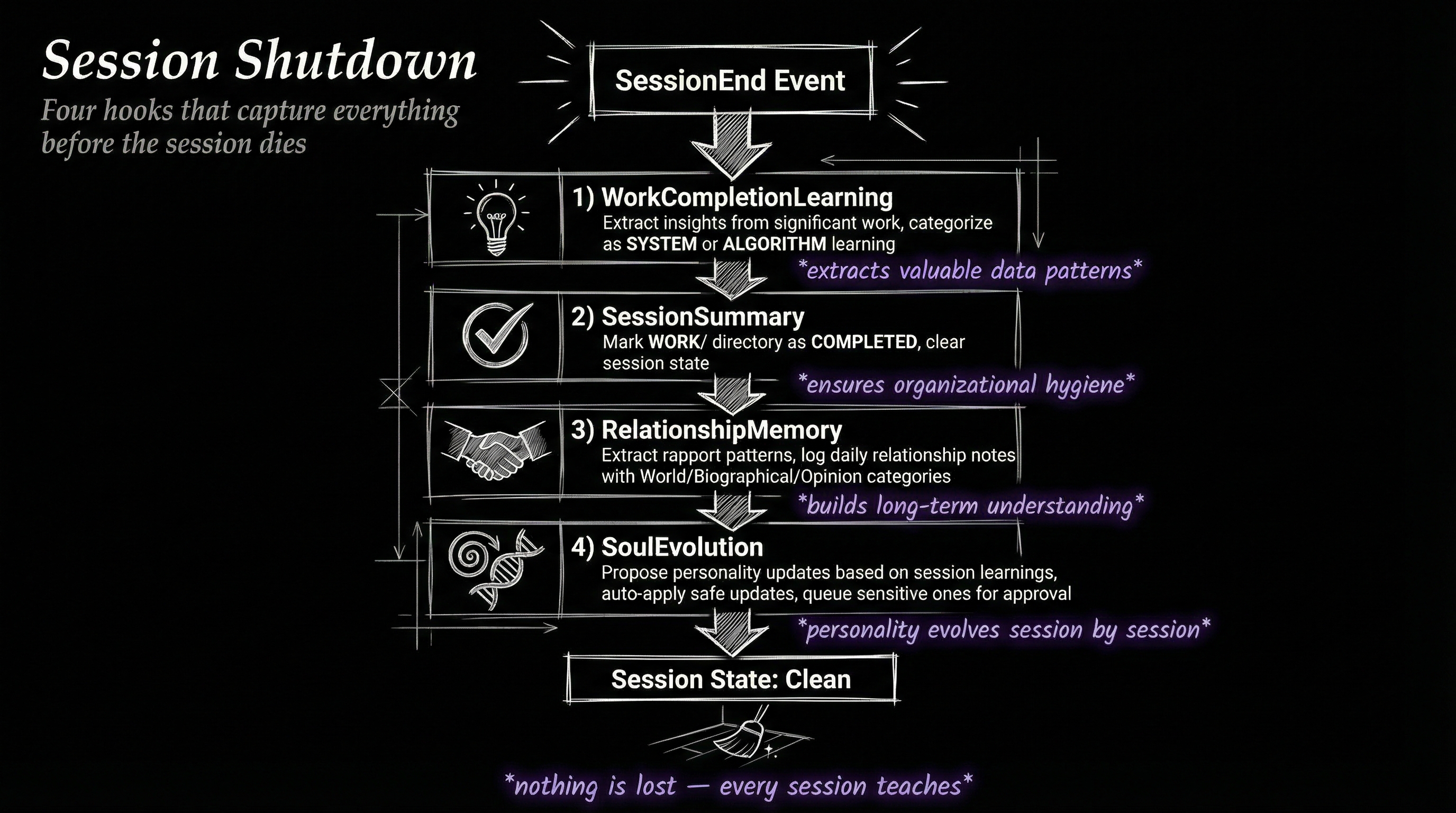
When a session ends — user types /exit, closes the terminal, or the session times out — four SessionEnd hooks fire. This is the Algorithm's equivalent of saving state before shutdown.
WorkCompletionLearning reads the session transcript, runs it through inference, and extracts learnings — what worked, what failed, what patterns emerged. These get categorized and written to MEMORY/LEARNING/ with timestamps and tags.
SessionSummary marks the work directory as completed, writes a summary file, and clears current-work.json so the next session starts clean.
RelationshipMemory captures interaction patterns — did the user seem satisfied? Were there frustration signals? This feeds long-term relationship context that shapes future interactions.
SoulEvolution is the most speculative hook. It tracks changes in behavioral patterns over time — a slow-moving log of how the system's personality and approach evolve across hundreds of sessions.
Design Principles
Three architectural decisions shape the entire hook system.
Non-blocking by default. Only two hooks write to stdout (LoadContext and AlgorithmEnforcement). Everything else is fire-and-forget. A slow voice server doesn't delay your response. A failed sentiment analysis doesn't crash your session.
Single responsibility. Each hook does exactly one thing. ExplicitRatingCapture doesn't also do sentiment analysis. SecurityValidator doesn't also set tab colors. This makes the system debuggable — when something breaks, you know exactly which hook to inspect.
Orchestration over duplication. The StopOrchestrator pattern avoids nine hooks all reading the same response independently. One read, nine consumers. This is both a performance optimization and a correctness guarantee — all nine handlers see the same response state.
The Nervous System in Numbers
| Metric | Count |
|---|---|
| Total hooks | 22 |
| Lifecycle events | 7 |
| PreToolUse matchers | 7 |
| Stop handlers | 9 |
| Shared libraries | 11 |
| State files managed | 6+ |
The hooks don't make the Algorithm smarter. They make it embodied. An Algorithm without hooks is a brain in a jar — it can think, but it can't sense the environment, can't remember yesterday, can't protect itself, can't speak.
Twenty-two hooks later, it has a nervous system.