How I Organize My iPhone Applications
It can be frustrating to not have a system for your iPhone app organization–especially if you’re an optimization freak like me. Here’s how I do it: I use four screens, organized in the following way:
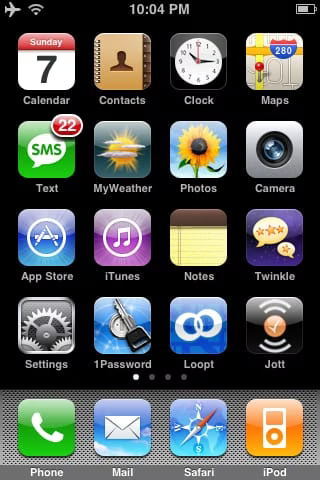
1. Primary Applications
These are the core applications that you use the most. I tend to keep the most important ones in the corners so they are easy to get to, e.g. Calendar, Maps, and Settings. Some apps of interest on this page are:
1Password : A good way of storing passwords .I’d advise against using it for sensitive stuff due to the iPhone’s unknown/weak security vs. physical tampering.
Loopt : Sign up your friends and see where they are around the country.
Twinkle : The best Twitter app right now for the iPhone.
Jott : Speak notes into it, or call its voice mail number and it’ll convert your voice to text and send the text to you.
MyWeather : The best weather app I’ve found
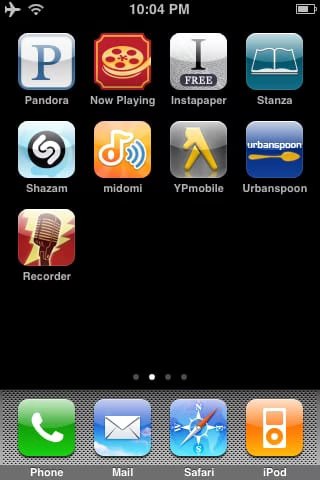
2. Secondary Applications
These are really just spillover from the primary page. Some apps of interest on this page are:
Pandora : A mandatory application. It does streaming of music you will almost certainly like based on the bands that you do like. Even works great on the desktop.
Now Playing : An awesome "going to the movies" app that finds theaters near you and gives you movie ratings using Rotten Tomatoes.
Instapaper : Find a site you like while browsing on your computer? Click instapaper on your desktop and a local copy will be saved to your iPhone for later reading.
Stanza : Tons of classic reading. A must have.
Shazam and Midomi : Run this app when a song is playing and you want to know who it is. It’ll give you the song name, band, and album.
Urbanspoon : Find something to eat in your area by shaking your iPhone.
Recorder : This is your old digital recorder, in an iPhone app.
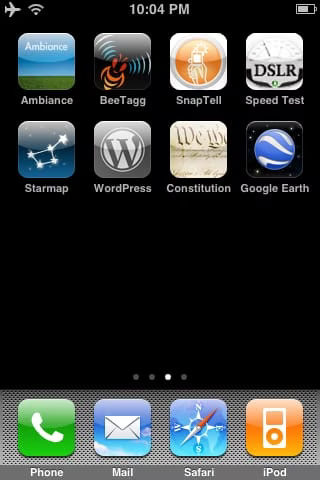
3. Specialized or Niche Applications
These include apps that you show off your device with, or only use occasionally. Some apps of interest on this page are:
Ambiance : Play all sorts of soothing sounds, including those from nature and stuff like "rain on tin roof".
BeeTagg : Snap pictures of QR Codes or Data Matrices to see where they take you.
SnapTell : Take a picture of a book or CD in a store to see where you can buy it for cheaper.
Speed Test : Check the speed of your EDGE, 3G, or Wifi connection.
Starmap : Shows you the stars you can see from your location.
Constitution : A pocket constitution, but way cooler.
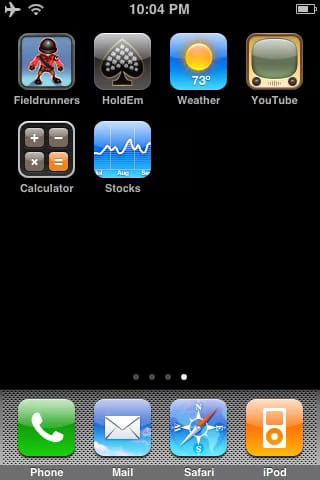
4. Unused Apple Applications and Games
This is where you put your unused default apps that you can’t delete, like Weather and Stocks. I also put my games here. My favorite games are:
- HoldEm : Apple’s excellent Poker app.
—
If you know of any apps that should be added to this list, or of a better way of organizing them, let me know in the comments or via email at daniel@danielmiessler.com. ::