<?xml version="1.0" encoding="utf-8"?><rss version="2.0"
	xmlns:content="http://purl.org/rss/1.0/modules/content/"
	xmlns:dc="http://purl.org/dc/elements/1.1/"
	xmlns:atom="http://www.w3.org/2005/Atom"
	xmlns:sy="http://purl.org/rss/1.0/modules/syndication/"
		>
<channel>
	<title>Comments on: Google Chrome Has Wicked Quick Searches</title>
	<atom:link href="http://danielmiessler.com/blog/google-chrome-has-wicked-quick-searches/feed" rel="self" type="application/rss+xml" />
	<link>http://danielmiessler.com/blog/google-chrome-has-wicked-quick-searches</link>
	<description>grep understanding</description>
	<lastBuildDate>Fri, 25 May 2012 02:15:50 +0000</lastBuildDate>
	<sy:updatePeriod>hourly</sy:updatePeriod>
	<sy:updateFrequency>1</sy:updateFrequency>
	<generator>http://wordpress.org/?v=3.3.2</generator>
	<item>
		<title>By: Daniel Miessler</title>
		<link>http://danielmiessler.com/blog/google-chrome-has-wicked-quick-searches/comment-page-1#comment-255056</link>
		<dc:creator>Daniel Miessler</dc:creator>
		<pubDate>Sat, 30 Apr 2011 18:48:00 +0000</pubDate>
		<guid isPermaLink="false">http://dmiessler.com/blog/google-chrome-has-wicked-quick-searches#comment-255056</guid>
		<description>&lt;p&gt;That is already part of Chrome.&lt;/p&gt;
</description>
		<content:encoded><![CDATA[<p>That is already part of Chrome.</p>
]]></content:encoded>
	</item>
	<item>
		<title>By: Chinasaur</title>
		<link>http://danielmiessler.com/blog/google-chrome-has-wicked-quick-searches/comment-page-1#comment-255055</link>
		<dc:creator>Chinasaur</dc:creator>
		<pubDate>Sat, 30 Apr 2011 18:36:00 +0000</pubDate>
		<guid isPermaLink="false">http://dmiessler.com/blog/google-chrome-has-wicked-quick-searches#comment-255055</guid>
		<description>&lt;p&gt;But with Firefox I can have my quicksearches saved through delicious and then they all autopropagate to any Firefox install that I add the delicious extension to.  Would be nice if Chrome delicious extension handled this...&lt;/p&gt;

&lt;p&gt;I suppose Chrome&#039;s sync feature may get the job done in terms of propagating my quicksearches between Chrome installs, but would be nicer to have the integration to a third party bookmarking service.&lt;/p&gt;
</description>
		<content:encoded><![CDATA[<p>But with Firefox I can have my quicksearches saved through delicious and then they all autopropagate to any Firefox install that I add the delicious extension to.  Would be nice if Chrome delicious extension handled this&#8230;</p>

<p>I suppose Chrome&#8217;s sync feature may get the job done in terms of propagating my quicksearches between Chrome installs, but would be nicer to have the integration to a third party bookmarking service.</p>
]]></content:encoded>
	</item>
	<item>
		<title>By: Daniel Miessler</title>
		<link>http://danielmiessler.com/blog/google-chrome-has-wicked-quick-searches/comment-page-1#comment-244923</link>
		<dc:creator>Daniel Miessler</dc:creator>
		<pubDate>Mon, 12 Jul 2010 22:25:08 +0000</pubDate>
		<guid isPermaLink="false">http://dmiessler.com/blog/google-chrome-has-wicked-quick-searches#comment-244923</guid>
		<description>&lt;p&gt;Just click &#039;manage search engines&#039; or whatever it&#039;s called.&lt;br&gt;&lt;br&gt;--&lt;br&gt;Daniel R. Miessler&lt;br&gt;W: &lt;a href=&quot;http://danielmiessler.com&quot; rel=&quot;nofollow&quot;&gt;http://danielmiessler.com&lt;/a&gt;&lt;br&gt;E: &lt;a href=&quot;mailto:daniel@danielmiessler.com&quot; rel=&quot;nofollow&quot;&gt;daniel@danielmiessler.com&lt;/a&gt;&lt;br&gt;P: 0x4048712D&lt;/p&gt;
</description>
		<content:encoded><![CDATA[<p>Just click &#39;manage search engines&#39; or whatever it&#39;s called.<br /><br />&#8211;<br />Daniel R. Miessler<br />W: <a href="http://danielmiessler.com" rel="nofollow">http://danielmiessler.com</a><br />E: <a href="mailto:daniel@danielmiessler.com" rel="nofollow">daniel@danielmiessler.com</a><br />P: 0x4048712D</p>
]]></content:encoded>
	</item>
	<item>
		<title>By: Legion1978</title>
		<link>http://danielmiessler.com/blog/google-chrome-has-wicked-quick-searches/comment-page-1#comment-244921</link>
		<dc:creator>Legion1978</dc:creator>
		<pubDate>Mon, 12 Jul 2010 20:04:57 +0000</pubDate>
		<guid isPermaLink="false">http://dmiessler.com/blog/google-chrome-has-wicked-quick-searches#comment-244921</guid>
		<description>&lt;p&gt;Is there an easy way to add the search strings?? Opera has an &quot;add search&quot; context menu item to do it. I cant do that on masked-url sites with chrome.&lt;br&gt;thnx&lt;/p&gt;
</description>
		<content:encoded><![CDATA[<p>Is there an easy way to add the search strings?? Opera has an &#8220;add search&#8221; context menu item to do it. I cant do that on masked-url sites with chrome.<br />thnx</p>
]]></content:encoded>
	</item>
	<item>
		<title>By: Why I Think Google Chrome Will Be Highly Successful &#124; dmiessler.com</title>
		<link>http://danielmiessler.com/blog/google-chrome-has-wicked-quick-searches/comment-page-1#comment-240146</link>
		<dc:creator>Why I Think Google Chrome Will Be Highly Successful &#124; dmiessler.com</dc:creator>
		<pubDate>Fri, 02 Jan 2009 05:18:47 +0000</pubDate>
		<guid isPermaLink="false">http://dmiessler.com/blog/google-chrome-has-wicked-quick-searches#comment-240146</guid>
		<description>&lt;p&gt;[...] I&#8217;m seriously impressed with Google&#8217;s newbile browser offering, Chrome. I like the simplicity of its interface, its speed, and most of all how it handles searches. [...]&lt;/p&gt;
</description>
		<content:encoded><![CDATA[<p>[...] I&#8217;m seriously impressed with Google&#8217;s newbile browser offering, Chrome. I like the simplicity of its interface, its speed, and most of all how it handles searches. [...]</p>
]]></content:encoded>
	</item>
	<item>
		<title>By: Jason Powell</title>
		<link>http://danielmiessler.com/blog/google-chrome-has-wicked-quick-searches/comment-page-1#comment-241797</link>
		<dc:creator>Jason Powell</dc:creator>
		<pubDate>Sun, 14 Dec 2008 20:20:32 +0000</pubDate>
		<guid isPermaLink="false">http://dmiessler.com/blog/google-chrome-has-wicked-quick-searches#comment-241797</guid>
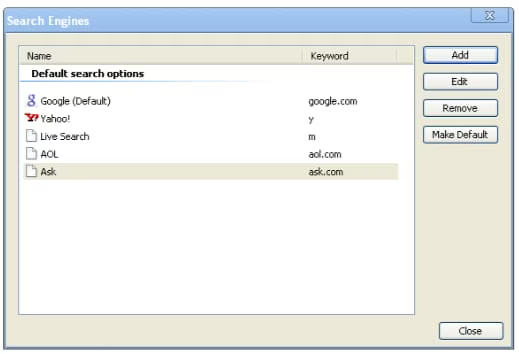
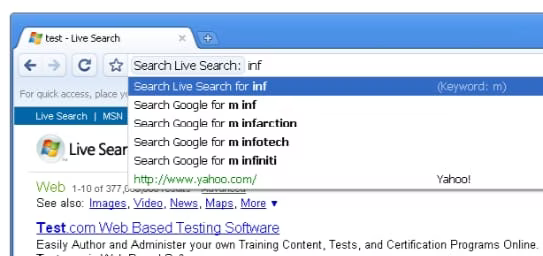
		<description>&lt;p&gt;&quot;...it’s quite simple and intuitive to add new search engines to the list...&quot;&lt;br&gt;&lt;br&gt;This is another one of the things that Chrome does for you automatically.  Any site you visit with a properly coded search field is automatically added by Chrome as a quicksearch.  That&#039;s why you&#039;d need to modify the keyword in your Chrome--the ones it already shows in the list are from sites you&#039;ve visited.&lt;br&gt;&lt;br&gt;The default way of searching using this feature is to type the domain name of the site into your browser, space, then your search terms.  As soon as you start typing in more words after the space, the browser changes to let you know you&#039;re searching.&lt;br&gt;&lt;br&gt;Nice, nice, nice.&lt;br&gt;&lt;br&gt;I can also build my &quot;custom&quot; quicksearches in Chrome like I can in Firefox.  You just need to modify the URL for the quicksearch.  Twenty times a day, I need to find a client&#039;s NetCommunity site. So, what I need is a Google search that already has the term &quot;netcommunity&quot; entered when I use the keyword &quot;n.&quot;&lt;br&gt;&lt;br&gt;I create a new quicksearch, copy in the URL from my Google quicksearch, and add,&lt;br&gt;&quot;netcommunity%20.&quot;  (The %20 enters a space after netcommunity.)&lt;br&gt;&lt;br&gt;Like so:&lt;br&gt;&lt;a href=&quot;http://www.google.com/search?q=netcommunity%2520%25s&amp;hl=en&quot; rel=&quot;nofollow&quot;&gt;http://www.google.com/search?q=netcommunity%20%...&lt;/a&gt;&lt;br&gt;&lt;br&gt;Guff about Chrome...&lt;br&gt;&lt;br&gt;Minor stuff.  Stuff I can step around.  Click a folder in your bookmarks bar, and the focus doesn&#039;t follow you if you hover over another folder.  You have to click off to lose that focus.  And, yeah, I think there should be an option on the right-click context menu that lets you add keyword searches manually, like in Firefox.&lt;/p&gt;
</description>
		<content:encoded><![CDATA[<p>&#8220;&#8230;it’s quite simple and intuitive to add new search engines to the list&#8230;&#8221;<br /><br />This is another one of the things that Chrome does for you automatically.  Any site you visit with a properly coded search field is automatically added by Chrome as a quicksearch.  That&#39;s why you&#39;d need to modify the keyword in your Chrome&#8211;the ones it already shows in the list are from sites you&#39;ve visited.<br /><br />The default way of searching using this feature is to type the domain name of the site into your browser, space, then your search terms.  As soon as you start typing in more words after the space, the browser changes to let you know you&#39;re searching.<br /><br />Nice, nice, nice.<br /><br />I can also build my &#8220;custom&#8221; quicksearches in Chrome like I can in Firefox.  You just need to modify the URL for the quicksearch.  Twenty times a day, I need to find a client&#39;s NetCommunity site. So, what I need is a Google search that already has the term &#8220;netcommunity&#8221; entered when I use the keyword &#8220;n.&#8221;<br /><br />I create a new quicksearch, copy in the URL from my Google quicksearch, and add,<br />&#8220;netcommunity%20.&#8221;  (The %20 enters a space after netcommunity.)<br /><br />Like so:<br /><a href="http://www.google.com/search?q=netcommunity%2520%25s&#038;hl=en" rel="nofollow"></a><a href="http://www.google.com/search?q=netcommunity%20%" rel="nofollow">http://www.google.com/search?q=netcommunity%20%</a>&#8230;<br /><br />Guff about Chrome&#8230;<br /><br />Minor stuff.  Stuff I can step around.  Click a folder in your bookmarks bar, and the focus doesn&#39;t follow you if you hover over another folder.  You have to click off to lose that focus.  And, yeah, I think there should be an option on the right-click context menu that lets you add keyword searches manually, like in Firefox.</p>
]]></content:encoded>
	</item>
	<item>
		<title>By: Artful Dodger</title>
		<link>http://danielmiessler.com/blog/google-chrome-has-wicked-quick-searches/comment-page-1#comment-241796</link>
		<dc:creator>Artful Dodger</dc:creator>
		<pubDate>Sun, 14 Dec 2008 17:55:49 +0000</pubDate>
		<guid isPermaLink="false">http://dmiessler.com/blog/google-chrome-has-wicked-quick-searches#comment-241796</guid>
		<description>&lt;p&gt;Nice I like it. I already got Google Chrome though. I like it because of its speed but its still not going to make me leave firefox. One of the greatest addon for firefox is adblock plus and I can&#039;t do without it.&lt;/p&gt;
</description>
		<content:encoded><![CDATA[<p>Nice I like it. I already got Google Chrome though. I like it because of its speed but its still not going to make me leave firefox. One of the greatest addon for firefox is adblock plus and I can&#39;t do without it.</p>
]]></content:encoded>
	</item>
	<item>
		<title>By: Jason Powell</title>
		<link>http://danielmiessler.com/blog/google-chrome-has-wicked-quick-searches/comment-page-1#comment-240171</link>
		<dc:creator>Jason Powell</dc:creator>
		<pubDate>Sun, 14 Dec 2008 15:20:32 +0000</pubDate>
		<guid isPermaLink="false">http://dmiessler.com/blog/google-chrome-has-wicked-quick-searches#comment-240171</guid>
		<description>&lt;p&gt;&quot;...it’s quite simple and intuitive to add new search engines to the list...&quot;&lt;br&gt;&lt;br&gt;This is another one of the things that Chrome does for you automatically.  Any site you visit with a properly coded search field is automatically added by Chrome as a quicksearch.  That&#039;s why you&#039;d need to modify the keyword in your Chrome--the ones it already shows in the list are from sites you&#039;ve visited.&lt;br&gt;&lt;br&gt;The default way of searching using this feature is to type the domain name of the site into your browser, space, then your search terms.  As soon as you start typing in more words after the space, the browser changes to let you know you&#039;re searching.&lt;br&gt;&lt;br&gt;Nice, nice, nice.&lt;br&gt;&lt;br&gt;I can also build my &quot;custom&quot; quicksearches in Chrome like I can in Firefox.  You just need to modify the URL for the quicksearch.  Twenty times a day, I need to find a client&#039;s NetCommunity site. So, what I need is a Google search that already has the term &quot;netcommunity&quot; entered when I use the keyword &quot;n.&quot;&lt;br&gt;&lt;br&gt;I create a new quicksearch, copy in the URL from my Google quicksearch, and add,&lt;br&gt;&quot;netcommunity%20.&quot;  (The %20 enters a space after netcommunity.)&lt;br&gt;&lt;br&gt;Like so:&lt;br&gt;&lt;a href=&quot;http://www.google.com/search?q=netcommunity%2520%25s&amp;hl=en&quot; rel=&quot;nofollow&quot;&gt;http://www.google.com/search?q=netcommunity%20%...&lt;/a&gt;&lt;br&gt;&lt;br&gt;Guff about Chrome...&lt;br&gt;&lt;br&gt;Minor stuff.  Stuff I can step around.  Click a folder in your bookmarks bar, and the focus doesn&#039;t follow you if you hover over another folder.  You have to click off to lose that focus.  And, yeah, I think there should be an option on the right-click context menu that lets you add keyword searches manually, like in Firefox.&lt;/p&gt;
</description>
		<content:encoded><![CDATA[<p>&#8220;&#8230;it’s quite simple and intuitive to add new search engines to the list&#8230;&#8221;<br /><br />This is another one of the things that Chrome does for you automatically.  Any site you visit with a properly coded search field is automatically added by Chrome as a quicksearch.  That&#39;s why you&#39;d need to modify the keyword in your Chrome&#8211;the ones it already shows in the list are from sites you&#39;ve visited.<br /><br />The default way of searching using this feature is to type the domain name of the site into your browser, space, then your search terms.  As soon as you start typing in more words after the space, the browser changes to let you know you&#39;re searching.<br /><br />Nice, nice, nice.<br /><br />I can also build my &#8220;custom&#8221; quicksearches in Chrome like I can in Firefox.  You just need to modify the URL for the quicksearch.  Twenty times a day, I need to find a client&#39;s NetCommunity site. So, what I need is a Google search that already has the term &#8220;netcommunity&#8221; entered when I use the keyword &#8220;n.&#8221;<br /><br />I create a new quicksearch, copy in the URL from my Google quicksearch, and add,<br />&#8220;netcommunity%20.&#8221;  (The %20 enters a space after netcommunity.)<br /><br />Like so:<br /><a href="http://www.google.com/search?q=netcommunity%2520%25s&#038;hl=en" rel="nofollow"></a><a href="http://www.google.com/search?q=netcommunity%20%" rel="nofollow">http://www.google.com/search?q=netcommunity%20%</a>&#8230;<br /><br />Guff about Chrome&#8230;<br /><br />Minor stuff.  Stuff I can step around.  Click a folder in your bookmarks bar, and the focus doesn&#39;t follow you if you hover over another folder.  You have to click off to lose that focus.  And, yeah, I think there should be an option on the right-click context menu that lets you add keyword searches manually, like in Firefox.</p>
]]></content:encoded>
	</item>
	<item>
		<title>By: Artful Dodger</title>
		<link>http://danielmiessler.com/blog/google-chrome-has-wicked-quick-searches/comment-page-1#comment-240170</link>
		<dc:creator>Artful Dodger</dc:creator>
		<pubDate>Sun, 14 Dec 2008 12:55:49 +0000</pubDate>
		<guid isPermaLink="false">http://dmiessler.com/blog/google-chrome-has-wicked-quick-searches#comment-240170</guid>
		<description>&lt;p&gt;Nice I like it. I already got Google Chrome though. I like it because of its speed but its still not going to make me leave firefox. One of the greatest addon for firefox is adblock plus and I can&#039;t do without it.&lt;/p&gt;
</description>
		<content:encoded><![CDATA[<p>Nice I like it. I already got Google Chrome though. I like it because of its speed but its still not going to make me leave firefox. One of the greatest addon for firefox is adblock plus and I can&#39;t do without it.</p>
]]></content:encoded>
	</item>
	<item>
		<title>By: Jason Powell</title>
		<link>http://danielmiessler.com/blog/google-chrome-has-wicked-quick-searches/comment-page-1#comment-236419</link>
		<dc:creator>Jason Powell</dc:creator>
		<pubDate>Sun, 14 Dec 2008 12:20:32 +0000</pubDate>
		<guid isPermaLink="false">http://dmiessler.com/blog/google-chrome-has-wicked-quick-searches#comment-236419</guid>
		<description>&lt;p&gt;&quot;...it’s quite simple and intuitive to add new search engines to the list...&quot;&lt;br&gt;&lt;br&gt;This is another one of the things that Chrome does for you automatically.  Any site you visit with a properly coded search field is automatically added by Chrome as a quicksearch.  That&#039;s why you&#039;d need to modify the keyword in your Chrome--the ones it already shows in the list are from sites you&#039;ve visited.&lt;br&gt;&lt;br&gt;The default way of searching using this feature is to type the domain name of the site into your browser, space, then your search terms.  As soon as you start typing in more words after the space, the browser changes to let you know you&#039;re searching.&lt;br&gt;&lt;br&gt;Nice, nice, nice.&lt;br&gt;&lt;br&gt;I can also build my &quot;custom&quot; quicksearches in Chrome like I can in Firefox.  You just need to modify the URL for the quicksearch.  Twenty times a day, I need to find a client&#039;s NetCommunity site. So, what I need is a Google search that already has the term &quot;netcommunity&quot; entered when I use the keyword &quot;n.&quot;&lt;br&gt;&lt;br&gt;I create a new quicksearch, copy in the URL from my Google quicksearch, and add,&lt;br&gt;&quot;netcommunity%20.&quot;  (The %20 enters a space after netcommunity.)&lt;br&gt;&lt;br&gt;Like so:&lt;br&gt;&lt;a href=&quot;http://www.google.com/search?q=netcommunity%2520%25s&amp;hl=en&quot; rel=&quot;nofollow&quot;&gt;http://www.google.com/search?q=netcommunity%20%...&lt;/a&gt;&lt;br&gt;&lt;br&gt;Guff about Chrome...&lt;br&gt;&lt;br&gt;Minor stuff.  Stuff I can step around.  Click a folder in your bookmarks bar, and the focus doesn&#039;t follow you if you hover over another folder.  You have to click off to lose that focus.  And, yeah, I think there should be an option on the right-click context menu that lets you add keyword searches manually, like in Firefox.&lt;/p&gt;
</description>
		<content:encoded><![CDATA[<p>&#8220;&#8230;it’s quite simple and intuitive to add new search engines to the list&#8230;&#8221;<br /><br />This is another one of the things that Chrome does for you automatically.  Any site you visit with a properly coded search field is automatically added by Chrome as a quicksearch.  That&#39;s why you&#39;d need to modify the keyword in your Chrome&#8211;the ones it already shows in the list are from sites you&#39;ve visited.<br /><br />The default way of searching using this feature is to type the domain name of the site into your browser, space, then your search terms.  As soon as you start typing in more words after the space, the browser changes to let you know you&#39;re searching.<br /><br />Nice, nice, nice.<br /><br />I can also build my &#8220;custom&#8221; quicksearches in Chrome like I can in Firefox.  You just need to modify the URL for the quicksearch.  Twenty times a day, I need to find a client&#39;s NetCommunity site. So, what I need is a Google search that already has the term &#8220;netcommunity&#8221; entered when I use the keyword &#8220;n.&#8221;<br /><br />I create a new quicksearch, copy in the URL from my Google quicksearch, and add,<br />&#8220;netcommunity%20.&#8221;  (The %20 enters a space after netcommunity.)<br /><br />Like so:<br /><a href="http://www.google.com/search?q=netcommunity%2520%25s&#038;hl=en" rel="nofollow"></a><a href="http://www.google.com/search?q=netcommunity%20%" rel="nofollow">http://www.google.com/search?q=netcommunity%20%</a>&#8230;<br /><br />Guff about Chrome&#8230;<br /><br />Minor stuff.  Stuff I can step around.  Click a folder in your bookmarks bar, and the focus doesn&#39;t follow you if you hover over another folder.  You have to click off to lose that focus.  And, yeah, I think there should be an option on the right-click context menu that lets you add keyword searches manually, like in Firefox.</p>
]]></content:encoded>
	</item>
	<item>
		<title>By: Artful Dodger</title>
		<link>http://danielmiessler.com/blog/google-chrome-has-wicked-quick-searches/comment-page-1#comment-236397</link>
		<dc:creator>Artful Dodger</dc:creator>
		<pubDate>Sun, 14 Dec 2008 09:55:49 +0000</pubDate>
		<guid isPermaLink="false">http://dmiessler.com/blog/google-chrome-has-wicked-quick-searches#comment-236397</guid>
		<description>&lt;p&gt;Nice I like it. I already got Google Chrome though. I like it because of its speed but its still not going to make me leave firefox. One of the greatest addon for firefox is adblock plus and I can&#039;t do without it.&lt;/p&gt;
</description>
		<content:encoded><![CDATA[<p>Nice I like it. I already got Google Chrome though. I like it because of its speed but its still not going to make me leave firefox. One of the greatest addon for firefox is adblock plus and I can&#39;t do without it.</p>
]]></content:encoded>
	</item>
</channel>
</rss>